CONTACT US
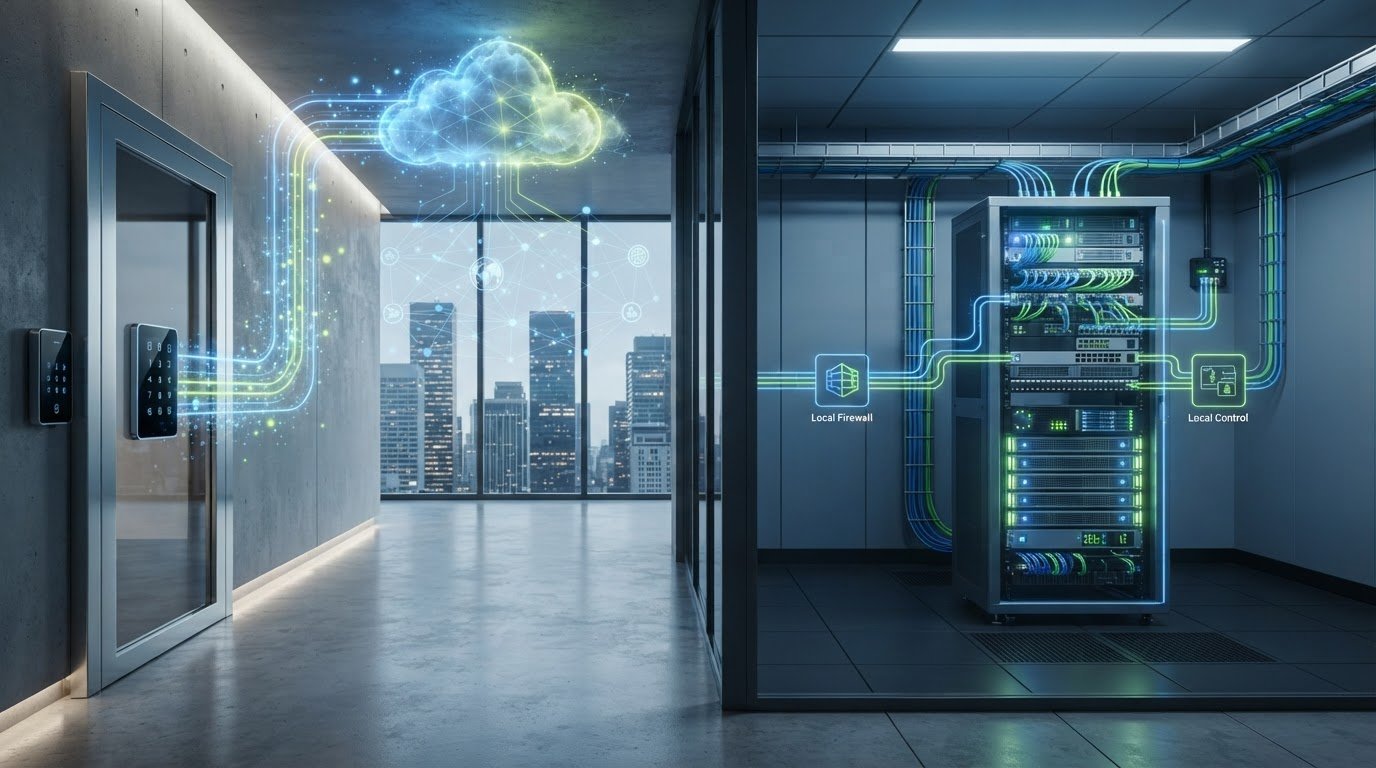
What happens at your doors if the internet connection drops, or if your team needs to change access permissions quickly? That question gets to the heart of cloud access control vs on-premise solutions: the right choice depends on more than where the software runs. It depends on how your facility needs to operate.
Compare how each model handles connectivity, administration, security, and ongoing maintenance. Also consider which functions need to keep working during an outage, who will manage access changes, and how the system must connect with your other security tools.
This guide explains the practical differences between deployment models and offers a step-by-step way to define your requirements. With network infrastructure, cybersecurity, and system integration in view, you can plan an approach around your facility’s day-to-day needs.
Key Takeaways
- Compare cloud access control vs on-premise solutions by where administration and system components are managed, not by assuming one model is inherently more secure.
- Document what happens to door operation and recovery during connectivity disruptions. Behavior depends on the system’s design.
- Assign responsibility for infrastructure, software, permissions, maintenance, and cybersecurity under each deployment model.
- Base your decision on site and user needs, connectivity, administration, and integrations with the broader security environment.
Cloud Access Control vs. On-Premise Solutions: What Changes for Your Business?
Choosing between cloud access control vs on-premise solutions starts with a practical distinction: where system management is hosted, not what the doors are designed to do. Both models manage controlled entry, but they can differ in administration, infrastructure, and reliance on network connections.
A cloud design uses cloud services for specified management functions, while an on-premise design hosts key management components locally. The exact division varies by system, so look at which functions run where rather than relying on the deployment label alone. Neither approach is automatically more secure. Security depends on the architecture and how its components are managed. This Cloud computing security overview provides context on broader cloud security concepts.
For a visual comparison, watch this overview of access control options:
What does cloud-based access control mean in a commercial facility?
Cloud-based access control uses cloud services for functions such as system administration. That does not mean every component or operation is handled the same way in every design. Locally hosted systems keep key management components at the facility. In short: Cloud-managed access control places specified management functions in cloud services; locally hosted access control keeps key management components on site.
Use these distinctions to guide your comparison:
| Consideration | Cloud-managed | Locally hosted |
|---|---|---|
| Management | Identify which functions use cloud services and who administers them. | Identify which key management components are hosted locally and who maintains them. |
| Connectivity | Determine which functions depend on network access and what continues during a disruption. | Determine how local operation works and which functions still rely on external connections. |
| Infrastructure | Plan for network, service, and cybersecurity responsibilities. | Plan for local hardware, maintenance, and cybersecurity responsibilities. |
| Fit | Consider whether centralized administration across sites suits your operations. | Consider how existing local infrastructure and control requirements affect the design. |
For a commercial facility, compare the management model with your network environment and wider security systems. For example, list which staff need to update permissions, which locations they administer, and which functions must continue during a connection disruption. Those details make the architecture decision more useful than the cloud or on-premise label alone.
How to Compare Cloud and On-Premise Access Control for Reliability and Security
Reliability is not determined by the hosting model alone. When weighing cloud access control vs on-premise solutions, map what happens if internet or internal network connectivity is disrupted. Identify which functions continue locally, which require a connection, and how the system returns to normal operation afterward. These behaviors depend on the system’s design, so include them in your facility’s continuity planning.
Does cloud access control create a reliability or security trade-off?
Not automatically. The outcome depends on architecture, configuration, connectivity, and operating procedures. Document outage behavior and recovery steps rather than assuming a cloud service stops every door or that local hosting removes cyber risk. A sound commercial access control installation plan accounts for the facility’s network and how staff will manage access through disruptions.
Responsibilities also differ by deployment. For cloud-managed functions, assign ownership for the service, network, software, permissions, and security settings. For locally hosted components, include on-site infrastructure and its maintenance alongside user administration. In either model, define how staff grant, change, and remove credentials, and how they review access records.
Plan integrations before selecting a system. List existing credentials, network infrastructure, video surveillance, and relevant workflows, such as staff onboarding or visitor access. Network segmentation and cybersecurity planning are part of the physical security conversation; the network security guide offers related planning context.
- Document which functions rely on internet or local network connectivity.
- Assign responsibility for outages, recovery, maintenance, and permission management.
- List credential, surveillance, and workflow integration requirements before selecting an architecture.
For facilities bringing access control into a wider commercial security environment, integrated security planning can connect network, cybersecurity, and surveillance considerations.
Choose an Access Control Architecture That Fits Your Facility and Plan Implementation
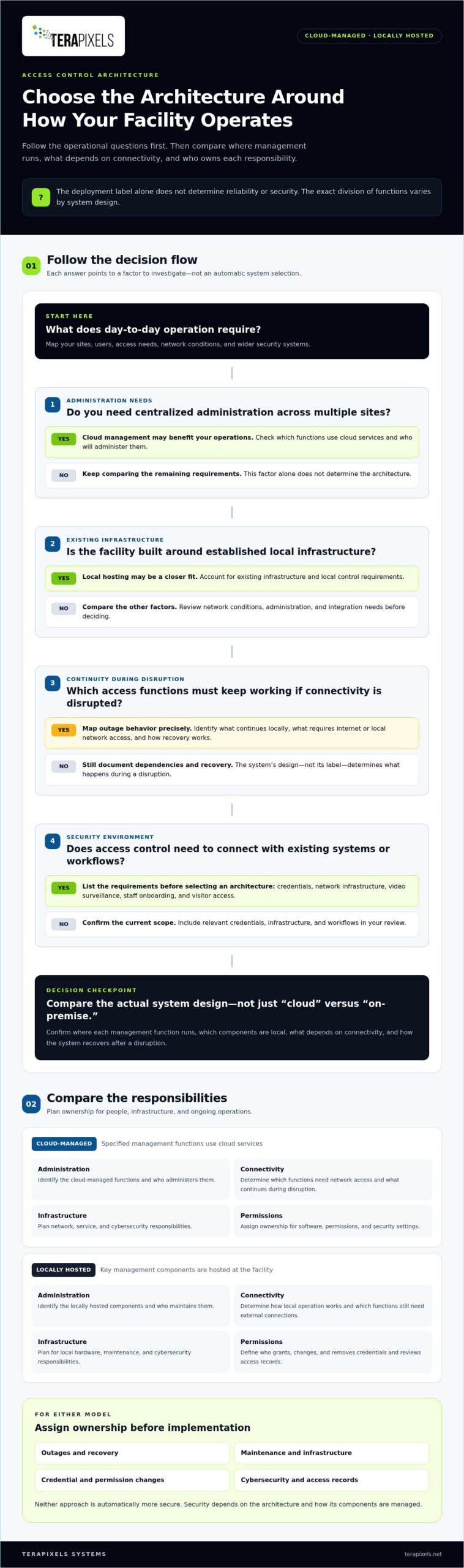
Start with operational requirements. A business with multiple sites and centralized administration needs may benefit from cloud management. A facility built around established local infrastructure may find local hosting a closer fit. The right choice in cloud access control vs on-premise solutions depends on how your people, locations, network, and security systems work together.
Use this sequence to turn those needs into a practical plan:
- Map sites and users. Record each location, entry point, user group, and access requirement. Note which staff need to administer access at each site.
- Define administration. Identify who manages credentials, approves changes, and assigns administrative roles.
- Review connectivity. Document network conditions and continuity needs for each facility, including which access functions must keep operating during a disruption.
- Document integrations. List existing credentials, surveillance systems, cabling, and relevant business workflows.
What should a business define before selecting an access control system?
Define credential processes for employees, contractors, and visitors. Specify how access should change when someone joins, changes roles, or leaves, and note continuity requirements for each entry point. A keycard access control comparison can help frame credential choices. For surveillance planning, consider how an AI security camera system may fit alongside access control.
Centralized cloud administration can suit operations where authorized staff need to manage access across sites through a shared approach. Local hosting may fit facilities with existing on-site infrastructure and a preference for locally managed components. Neither is the default answer. Match the model to administrative capacity, connectivity, and documented operating needs.
Terapixels Systems designs and deploys commercial cloud-based access control as part of a broader security environment. Its work can bring access control planning together with cybersecurity, structural cabling, and surveillance considerations. Explore integrated commercial security planning as you define the architecture for your facility.
Build an Access Control Plan That Can Grow With Your Facility
Turn your decision into a practical design brief before implementation begins. Record the outcomes your facility needs, who will oversee access administration, and how future site or workflow changes should be handled. Include the requirements that may affect system design, such as connectivity, integrations, and permission processes. This gives stakeholders a shared reference point and helps keep the system aligned with business operations over time.
Use cloud access control vs on-premise solutions as a starting point, not the final decision by itself. Terapixels Systems designs and deploys commercial cloud-based access control alongside cybersecurity, structural cabling, remote monitoring, and surveillance capabilities, bringing these considerations into the broader security environment.
A well-considered architecture gives your team a clearer path from current requirements to future needs. Build the plan around the way your facility operates.
Frequently Asked Questions
Can cloud access control work if the internet connection goes down?
It may, depending on how the system is designed and which functions rely on internet access. For example, a facility may need certain doors to follow a defined access policy during an outage, even if administrators cannot make remote changes until connectivity returns. Document expected door behavior, credential handling, and recovery procedures for each site before deployment.
Is cloud access control more secure than an on-premise system?
Neither model is automatically more secure. Protection depends on the system’s architecture, configuration, and how digital and physical access are managed. Consider who can change permissions, how administrative accounts are controlled, and how the access system fits into the organization’s cybersecurity practices. A sound security plan addresses both network risks and access to the facility.
Can a business combine cloud and on-premise access control?
Yes. A business can use a hybrid architecture, assigning different components or locations to cloud-managed and locally hosted arrangements. For example, an organization might prefer centralized administration for some sites while retaining local infrastructure at a facility with specific operational requirements. Define how permissions, records, and responsibilities are coordinated across both environments.
How should a business choose between cloud and on-premise access control?
Start with the operational demands of each location, then compare who will administer access, maintain infrastructure, and manage cybersecurity. When evaluating cloud access control vs on-premise solutions, consider planned growth, existing systems, and how access policies fit staff workflows. A written requirements list helps decision-makers weigh trade-offs consistently and identify integration needs before implementation planning begins.