For a commercial surveillance system upgrade, choose an NVR with enough channels for the cameras you need and room for planned expansion. A 16-channel system provides a wider depth of surveillance than an 8-channel system, while an open platform can help retain existing cameras and bring security equipment into one solution.
Replacing every camera isn’t always necessary to modernize a business surveillance system. The right approach depends on your current equipment, coverage needs, network capacity, and how you want to manage video across locations. This guide explains how existing cameras may fit into an upgrade, what cloud-managed video can centralize, and how to plan NVR capacity. You’ll have a practical framework for improving day-to-day security without replacing equipment that can still serve its purpose.
Key Takeaways
- Assess camera compatibility and existing infrastructure before deciding which equipment to retain or replace.
- Plan cloud video management around network capacity, locations, users, and how your team needs to access footage.
- Choose NVR channel capacity based on current camera coverage and likely expansion, not only today’s camera count.
- Coordinate surveillance planning with cabling, cybersecurity, and monitoring needs to create a more integrated business system.
Using an open platform to retain existing cameras and security systems
An open platform can modernize video security while preserving compatible equipment and avoiding unnecessary replacement.
Retaining Existing Cameras
An open platform can integrate existing cameras, alarm panels, access control, and other security systems into one solution. Compatibility is key: assess each device and its role before deciding what to retain. Upgrade costs depend on factors such as camera count, compatibility, integration needs, and site complexity. For an analog CCTV migration, connect suitable cameras through compatible IP conversion or replace them with IP cameras, then integrate the recording and network connections.
Cloud Cameras and Onboard Recording
Cloud cameras can add channels with onboard recording and a dedicated analytics processor, even when an existing server has limitations. This can expand coverage without requiring every legacy camera to be replaced at once. Server-side video analytics can also analyze footage from existing cameras, adding security and operational capabilities. Identify the areas that need analytics and assess whether the current server can handle the added processing and video traffic.
Compatibility Across Camera Deployments
For a multi-camera deployment, map camera locations, connection types, and recording needs before integration. Wired IP and analog systems can suit commercial sites that need centralized recording, reliable connectivity, continuous surveillance, and scalable coverage. To move from analog CCTV to IP, plan compatible network connections, connect IP cameras to the recording system, and transition camera groups in stages. Protect access with unique credentials, restricted user permissions, and current software. A phased cutover helps maintain coverage as equipment changes.
Commercial System Configurations
Commercial camera systems range from 2 cameras to 64 cameras, with configurations shaped by site coverage and recording requirements. An 8 Channel NVR is one available option; select capacity around the cameras in use and planned expansion. Wired IP systems can support centralized recording, while server-side analytics can extend the usefulness of existing cameras. Reusing suitable devices, cabling, and hardware can limit upgrade time and reduce the period without video surveillance.
Cloud-managed video and centralized system management
Cloud management can bring video, users, and locations into one system. The right setup depends on network capacity, storage priorities, and how your teams use footage.
On-Premises or Cloud Management
On-premises video management keeps recording and software on site, requiring servers and software to be purchased, installed, updated, and maintained. Cloud-hosted CCTV involves regular subscription charges, with updates and maintenance included. Compare where footage should be stored, who will manage the infrastructure, and whether network capacity, bandwidth, and performance can handle video traffic. Cloud management can centralize devices, users, and locations, with off-site access through an internet-connected mobile device.
Video Resolution Options
Choose resolution according to the detail needed for each camera’s coverage area. HD IP camera systems can provide 1080p HD or 4K, and HD IP security cameras can reach above 30-megapixel resolution. 4K video has 400% more pixels per frame than standard 1080p HD. Understanding how resolution and screen distances impact what operators can perceive—as explained by activu.com—helps teams choose the appropriate visual detail for monitoring environments. Higher resolution can increase network traffic and storage demand, so align image quality with available infrastructure and recording needs. Local storage retention depends on capacity, resolution, and recording settings.
Video analytics can help teams find relevant activity without reviewing every recording. Search and alerts can focus on people or vehicles. Line-crossing analytics detects movement across a virtual line, while loitering analytics flags activity that remains in an area beyond a defined period.
Upgrade or Replacement Decisions
Upgrade when current video quality, network performance, storage, or centralized access no longer supports business coverage and management needs. Replace equipment when it cannot connect to the required system or deliver the needed image detail. Assess camera performance, network capacity, recording requirements, and desired analytics together before choosing the scope of work. A cloud surveillance system design can align those requirements with centralized management.
Selecting NVR channel capacity for business surveillance
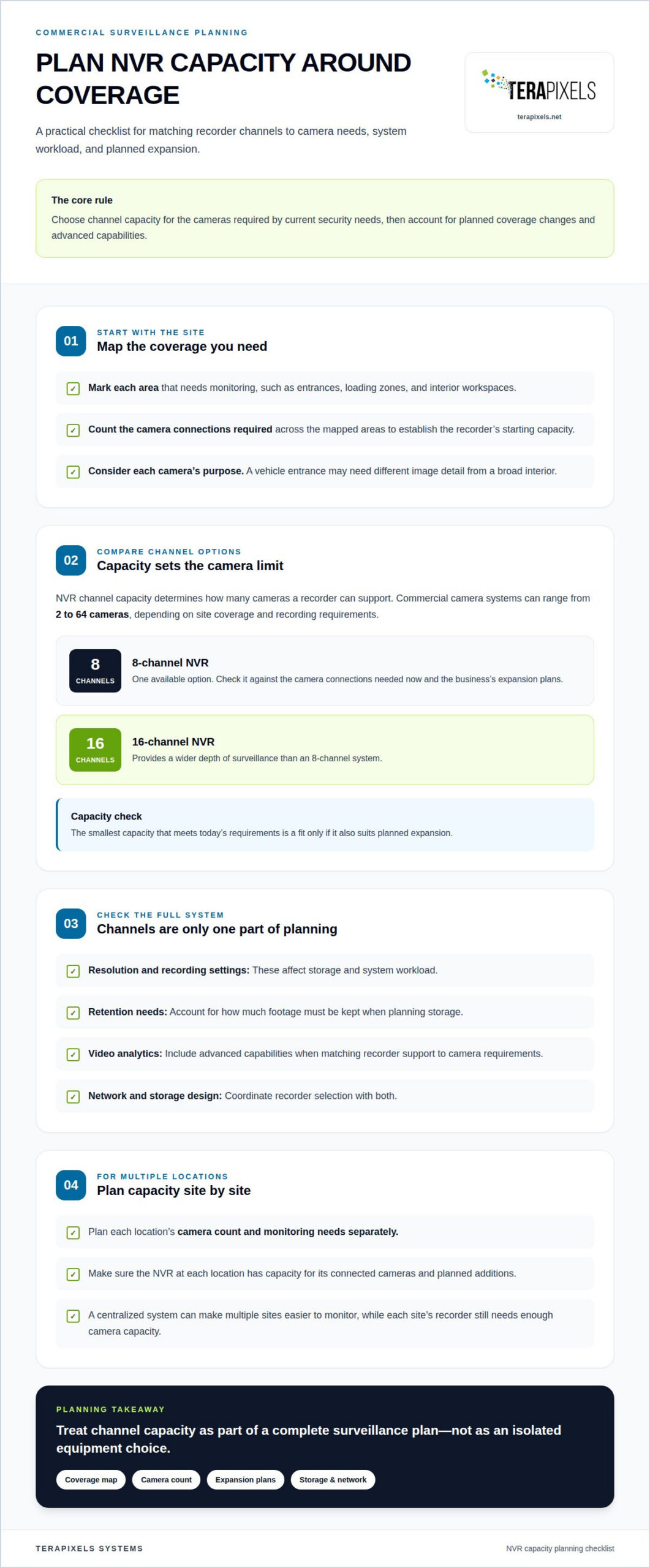
NVR channel capacity determines how many cameras a recorder can support. Choose capacity for the cameras needed to meet your current security requirements, then account for planned coverage changes and advanced capabilities.
A useful starting point is a camera map. Mark each area that needs monitoring, such as entrances, loading zones, and interior workspaces, then total the camera connections required. An 8 Channel NVR is one available option. A 16 Channel system provides a wider depth of surveillance than an 8 Channel system. The practical takeaway: select the smallest capacity that covers current requirements only if it also suits the business’s expansion plans.
Channel count is only one part of recorder planning. Resolution, recording settings, retention needs, and video analytics all affect storage and system workload. For example, a camera monitoring a vehicle entrance may need different image detail from one covering a broad interior. Match the NVR’s supported capabilities to camera requirements instead of assuming that more channels alone will provide better coverage.
For multiple business locations, plan each site’s camera count and monitoring needs separately. A centralized system can make sites easier to monitor, but the NVR at each location still needs capacity for its connected cameras. Allow for planned additions, and coordinate recorder selection with the network and storage design. This makes channel capacity part of a complete surveillance plan, not an isolated equipment choice.
Terapixels Systems: Cloud-Based Surveillance Systems
Terapixels Systems provides cloud-based surveillance systems for businesses planning to modernize video management, integrate security needs, or move toward centralized oversight. Turn to the team when you’re assessing which cameras to retain, how to manage video across locations, or what NVR capacity suits your coverage plan.
Surveillance also connects with broader operational priorities. Remote Monitoring Management can support oversight needs, while Cyber Security addresses the protection of business technology. Considering these requirements together helps shape a system plan around existing infrastructure, video access, and future needs, rather than treating cameras as an isolated purchase.
Share your current camera setup, coverage goals, and management priorities with Terapixels Systems. Contact the team to discuss the next steps for your business surveillance system.
Make Your Next Upgrade a Deliberate Step Forward
A commercial surveillance system upgrade is an opportunity to align video security with the way your business operates and grows. Before moving ahead, bring your coverage priorities, infrastructure plans, and system management goals into one clear project scope. This gives the upgrade a practical direction, from equipment decisions through implementation.
Terapixels Systems can coordinate surveillance planning with Structural Cabling, helping account for the infrastructure that supports business communications and security systems. A coordinated plan can also keep the next stage of your technology roadmap in view.
With a clear plan and the right technical partner, you can move forward with greater confidence in your business’s security infrastructure.
Frequently Asked Questions
What type of security camera system is best for a business?
The best system fits the site’s security priorities, daily routines, and review process. A commercial surveillance system upgrade should account for how staff respond to incidents, which areas need closer attention, and whether security teams oversee one site or several. For example, a retail location may prioritize entrances and transaction areas, while a distribution facility may focus on vehicle access and goods movement.
What are the latest commercial surveillance system technologies and upgrade options?
Options include cloud-managed video, AI analytics, and cameras with onboard recording and analytics processing. Businesses can also integrate surveillance with access control to help teams review video alongside entry events. Analytics may help identify relevant activity involving people or vehicles. Choose features based on specific operational tasks, such as reviewing activity at a loading area, rather than adopting technology without a defined purpose.
How to assess existing cameras, wiring, storage, and network before upgrading?
Inventory camera locations, condition, image usefulness, and connection types. Trace cable routes and note infrastructure constraints, then assess recording equipment, available storage, and network performance under video traffic. Include areas where business operations have changed or where camera views no longer support incident review. This assessment helps identify which components remain useful and where system limitations affect operations.
How to choose commercial surveillance cameras, NVRs, and video management software?
Match cameras to the views and image detail required at each location, then choose a recorder that supports the camera count and recording workload. Software should fit the team’s review process, user access needs, and site structure. During a commercial surveillance system upgrade, a multi-location business might prioritize consistent management across sites while tailoring staff access to their responsibilities.
What are the requirements for video retention, resolution, and storage capacity?
Set retention based on the business purpose of recorded footage and applicable requirements. Storage needs depend on camera count, resolution, recording settings, and retention duration. Higher-resolution footage requires more storage, so assign greater detail where it supports a clear security task. Documenting these decisions together helps align storage capacity with practical review needs and the system’s intended use.