
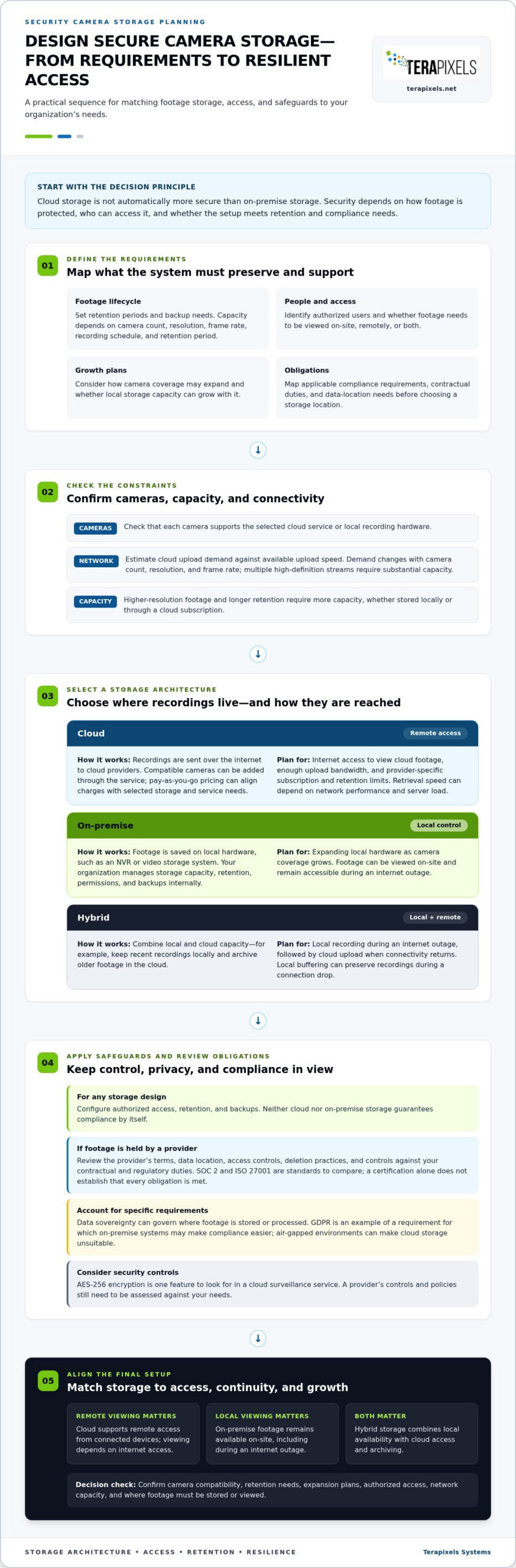
Cloud storage isn’t automatically more secure than on-premise storage. In the cloud vs on-premise security camera storage decision, security depends on how footage is protected, who can access it, and whether the setup meets your organization’s compliance and retention needs. On-premise storage offers direct control; cloud storage can support remote access and provider-managed security controls.
It’s reasonable to favor the option that keeps sensitive footage secure and available when needed. This comparison explains how cloud-only, on-premise, and hybrid systems differ, what to consider for regulatory compliance, and how internet access affects video viewing and storage. You’ll also find a practical guide to matching a system to your operational and security requirements.
Key Takeaways
- Assess how easily local storage can expand as camera coverage grows, and how quickly staff need to access footage on-site or remotely.
- Map retention, backup, access permissions, and applicable compliance requirements before choosing where surveillance footage is stored.
- Evaluate whether your network can support cloud uploads and retrieval, and consider how local buffering could help maintain access during an internet outage.
- Use remote monitoring management to align surveillance operations with your business’s security and infrastructure needs.
What’s the Difference Between a Cloud and Hybrid Cloud Security Camera System?
Cloud storage sends recordings over the internet to cloud providers, while on-premise systems save footage on local hardware. Hybrid systems combine both, balancing remote access with local availability.
Cloud Storage Setup and Retention
To set up cloud storage, connect compatible cameras to the service, configure authorized access, and select a retention plan. Subscription requirements and retention limits depend on the provider’s plan. Local NVR systems store video on-site, so organizations need to plan storage capacity as cameras are added. A hybrid setup can keep recent recordings locally and archive older footage in the cloud.
Cloud Scalability and Remote Access
Cloud-based scalability lets organizations add compatible cameras without expanding an on-site NVR for every increase. Pay-as-you-go pricing can align charges with selected storage and service needs. Authorized users can access cloud footage remotely from connected devices, but viewing depends on internet access. By comparison, local footage can be viewed on-site, including during an internet outage.
For a 48-camera high-resolution system, storage needs depend on resolution, frame rate, recording schedule, and retention period. An on-premise NVR or video storage system’s cost depends on camera count, capacity, hardware, and implementation requirements. Camera compatibility matters in either setup: the camera must support the chosen cloud service or local recording hardware.
For either option, choose compatible cameras, configure storage and retention, and assign authorized access. Cloud uploads also require enough internet bandwidth for the number of cameras and the video quality.
| Storage option | Scalability | Video access | Internet outage |
|---|---|---|---|
| Cloud | Expand through the service | Remote access | Cloud access requires internet |
| On-premise | Expand local hardware | On-site viewing | Local footage remains accessible |
| Hybrid | Combine local and cloud capacity | Local and remote access | Local recording continues |
Choose based on camera compatibility, retention needs, expansion plans, and where authorized users need to view footage.
Which Is Better For Regulatory Compliance: Cloud Or On-Premise?
Neither option guarantees compliance on its own. Choosing cloud vs on-premise security camera storage means weighing retention rules, data access, contractual duties, and the controls your organization can manage.
Local Video Retention and Compliance
On-premise storage keeps footage on physical servers your organization controls, making it easier to set retention periods, access permissions, and backup procedures internally. Organizations may need to account for video retention and backup requirements when choosing a storage setup. According to the European Union, GDPR is an example of a requirement for which on-premise systems may make compliance easier. Cloud storage shifts some control to providers and their policies.
Privacy, Data Ownership, and Compliance
With local storage, your organization manages sensitive video data and decides which authorized users can access it. With cloud storage, recordings are entrusted to a third-party provider, so review its terms, data location, access controls, and deletion practices against your contractual and regulatory duties. Data sovereignty matters when requirements govern where footage is stored or processed. A provider’s certification can help, but your organization still depends on its controls.
Security Standards and Storage Needs
Before choosing cloud storage, compare provider controls with your requirements, including SOC 2 and ISO 27001. A cloud vs on-premise security camera storage comparison should also account for environments that require air-gapped systems, which can make cloud storage unsuitable. A certification alone doesn’t establish that a service meets every obligation.
How much storage do security cameras need? Capacity depends on camera count, resolution, frame rate, recording schedule, and retention period. Higher-resolution footage and longer retention require more capacity, whether stored locally or through a cloud subscription.
A practical review of commercial security infrastructure can help align storage, access, and backup decisions with your compliance needs.
Cloud-only camera video storage and remote access
Cloud-only video surveillance sends camera footage over an internet connection to remote servers. Authorized users can retrieve recordings from connected devices, while cloud providers handle maintenance, updates, and most security controls. Retrieval speed still depends on network performance and server load, so remote viewing can slow when either is constrained.
Bandwidth is a key design factor. Upload demand changes with camera count, resolution, and frame rate; streaming several high-definition cameras requires substantial capacity. Before implementation, estimate those demands and compare them with available upload speed. Cloud providers may also charge for storage, bandwidth, and video retrieval, so retention and access patterns affect ongoing costs.
Protect sensitive recordings with strong security controls. AES-256 encryption is one feature to look for in a cloud surveillance service. Cloud storage also places footage with a third-party provider, so permissions, retention settings, and the provider’s terms matter. Camera-local storage presents a different risk: if a camera is stolen before tampering is detected, its footage may be lost.
An internet outage affects access differently across storage designs. Cloud services require internet access, while on-premise footage can remain available on-site. Hybrid systems can keep recording locally during an outage, then upload footage to the cloud once connectivity returns. Local video buffering can also preserve recordings during a connection drop.
For organizations balancing remote access with resilience during outages, hybrid storage can retain critical footage locally and create a cloud backup. The practical choice depends on network capacity, retrieval needs, and how much footage must remain accessible without internet service.
Terapixels Systems: Remote Monitoring Management
Terapixels Systems provides Remote Monitoring Management for organizations planning how camera monitoring fits their storage and security needs. This service can support decisions about who oversees video systems, how cloud surveillance fits existing infrastructure, and how cybersecurity considerations shape access to footage.
Cloud-Based Surveillance Systems, Cyber Security, and Structural Cabling address connected parts of a commercial security setup. These services help businesses consider surveillance, network infrastructure, and protection of connected systems as part of a coordinated plan. The right mix depends on operational needs, camera placement, and the organization’s storage approach.
Contact Terapixels Systems to discuss your commercial surveillance requirements.
Turn Your Storage Decision Into a Practical Plan
Treat your cloud vs on-premise security camera storage decision as the start of an operational plan, not an isolated technology choice. Identify who will oversee the system, how its controls fit your security priorities, and how the camera network will connect with existing infrastructure. Documenting those responsibilities helps your team carry the decision into implementation and ongoing management.
Terapixels Systems provides Remote Monitoring Management, Cyber Security, and Structural Cabling to support connected commercial security needs. These services can help align monitoring operations, cyber protections, and the physical network that carries camera data.
A considered plan gives your team a clear foundation for dependable surveillance and compliance decisions.
Frequently Asked Questions
Is cloud security more secure than on-premise solutions?
Neither model is automatically more secure; protection depends on how its controls are configured and maintained. Cloud storage relies partly on the provider’s safeguards and policies, while on-premise security places more operational responsibility on your organization. Compare access permissions, encryption, account management, and maintenance practices across the full system, including cameras, networks, storage, and user devices.
Is Hybrid Cloud Good for Video Surveillance Footage?
Yes, a hybrid setup can suit organizations that need both local recording and cloud-based access or backup. For example, a business can prioritize locally retained footage for critical areas and send selected recordings to cloud storage. Define which footage needs each destination, who can retrieve it, and how staff will access recordings if the internet connection is interrupted.
The Verdict: Which Type of Storage Is Best for Video Surveillance?
The best option is the one that fits your organization’s operating requirements and risk controls. Choose on-premise storage when direct control, legacy integration, or an air-gapped environment is central. Consider cloud storage when remote access and provider-managed systems better suit your operations. Hybrid can bridge those needs, provided your team can manage both environments and their access policies.
What Is On-Premises Storage?
On-premises storage means video is recorded and kept on hardware at the organization’s site, such as an NVR in a secured equipment room. Staff can review footage through the local system, subject to configured permissions. The organization is responsible for maintaining hardware, managing capacity, and protecting the physical equipment and stored recordings.
Why Do Some Organizations Still Choose On-Premise Security?
Organizations may prefer on-premise security when existing systems are difficult to migrate or policy requires footage to remain within their own environment. Local infrastructure can also support operations that must continue without internet access. This approach gives the organization direct control, but also requires planning for hardware upkeep, access management, and storage expansion.