
An NDAA-compliant label is a starting point, not proof that every part of a camera system meets your requirements. When choosing an NDAA compliant camera system, you need to know which products and components a claim covers, especially if a contract, funding condition, or procurement policy is involved. The right choice depends on more than a camera’s brand or a line on a spec sheet.
This guide explains how to check compliance claims and supporting documents, compare cameras, recorders, software, and cloud services, and assess whether a complete system fits your security and connectivity needs. It also outlines practical questions to ask an integrator about installation, cybersecurity, and monitoring.
Key Takeaways
- Start by confirming which contract, funding condition, or procurement policy applies to your organization.
- When choosing an NDAA compliant camera system, assess the full solution, including cameras, recorders, software, and connected services.
- Request model-specific written compliance statements and supporting documentation instead of relying on a general claim or logo.
- Ask a commercial partner how deployment will be coordinated and how cybersecurity, connectivity, and monitoring will be addressed.
Choosing an NDAA-Compliant Camera System Starts with the Requirement
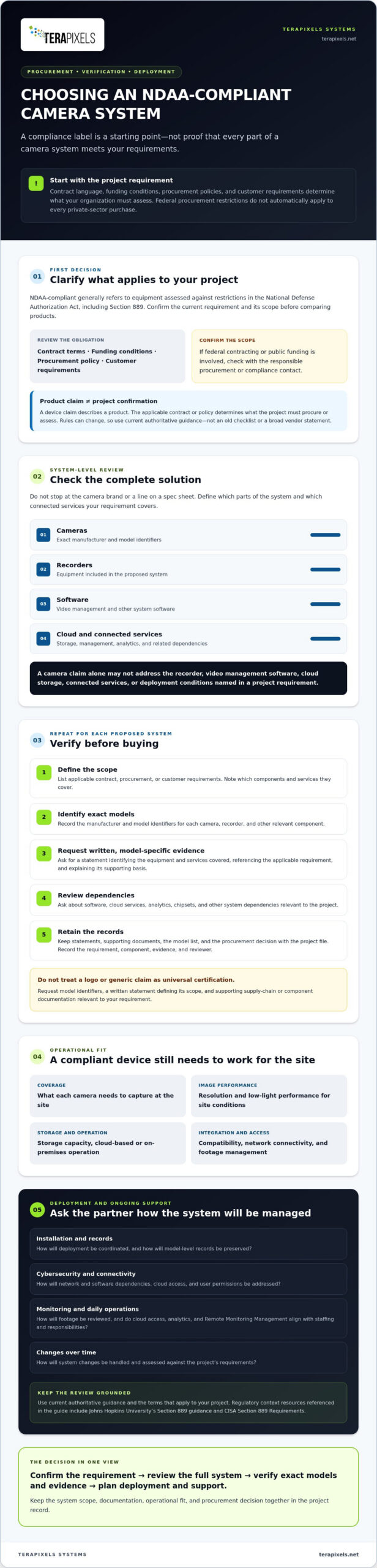
An NDAA-compliant camera system is generally understood to be equipment assessed against restrictions in the National Defense Authorization Act, including Section 889. The National Defense Authorization Act (NDAA) provides general background, but it is not a substitute for checking current official guidance or the terms that apply to your project. Federal procurement restrictions do not automatically make every private-sector camera purchase subject to the same requirements.
Clarify the requirement before comparing equipment. Review contract language, funding conditions, procurement policies, and customer requirements. If a federal contract or public funding is involved, confirm the applicable scope with the responsible procurement or compliance contact. Section 889 and related rules can change, so check current authoritative guidance rather than relying on an old checklist or a vendor’s broad statement.
Does NDAA compliance apply to your organization or project?
Applicability depends on the buyer’s obligations, not just a camera’s marketing. A product claim describes a device; a project-specific requirement determines what your organization must procure or assess. A camera’s compliance claim is not the same as confirmation that the complete project meets its procurement requirements.
Define which parts of the system the requirement covers. A camera claim alone may not address the recorder, video management software, cloud storage, connected services, or deployment conditions specified in a contract or policy. For example, a project may require review of both camera models and the software or cloud services used to manage footage. Treat choosing an NDAA compliant camera system as a system-level review, and keep a record of the components and obligations checked.
How to Verify an NDAA-Compliant Camera System Before Buying
Use the same review process for each proposed system, and check exact equipment models rather than relying on a brand-level claim. For context on the regulation, consult Johns Hopkins University’s guidance on Section 889, then confirm current requirements against authoritative sources and your project’s terms.
- Define the scope. List the contract, procurement, or customer requirements. Note whether they cover cameras, recorders, software, cloud services, or other components.
- Identify exact models. Record the manufacturer and model identifiers for each camera, recorder, and other relevant component.
- Request written evidence. Ask the vendor for a model-specific statement that identifies the equipment and services covered, references the applicable requirement, and explains its supporting basis.
- Review dependencies. Ask about software, cloud services, analytics, chipsets, and other system dependencies that could affect the project’s review.
- Retain records. Keep the statements, supporting documents, model list, and procurement decision with the project file. A simple record of the requirement, component, evidence, and reviewer can make later changes easier to assess.
A logo or generic claim does not establish the scope of a system’s status. Ask for model identifiers, a written statement defining its scope, and supporting supply-chain or component documentation relevant to your requirement. Do not assume that any single document serves as universal certification.
What documentation and system details should buyers request?
Assess operational fit alongside documentation. Compare the coverage each camera needs to provide, resolution and low-light performance for the conditions at the site, storage capacity, cloud-based or on-premises operation, and compatibility with existing systems. Check how the proposed setup will affect network connectivity and how footage will be accessed and managed. A camera that meets a compliance requirement still needs to capture useful footage and work with your operating environment. For businesses that also manage field operations and mobile assets alongside facility security, tools from Fleet Software Solutions show how integrated cameras and tracking software can work together in demanding environments.
For a coordinated review of cameras, connectivity, cybersecurity, and monitoring, explore commercial surveillance system planning with a technology partner.
Choose a Commercial Camera Partner for Deployment and Ongoing Support
Even a well-documented equipment selection needs a deployment plan. Ask how the provider will preserve model-level records, coordinate installation, and explain network and software dependencies. For regulatory context, review the CISA Section 889 Requirements and confirm how current guidance relates to your project.
Consider how the system will work day to day. Cloud-based surveillance may suit teams that need remote access, while analytics and Remote Monitoring Management should align with staffing, review practices, and operational responsibilities. Clarify how user permissions, cloud access, and system changes will be handled. For related planning, see this guide to commercial AI security camera systems and this overview of network security for small businesses.
Questions to ask an integrator before approving the system
- Who confirms documentation for each camera and recorder model, and where will those records be maintained?
- How will equipment or software changes be documented and checked against project requirements?
- What does installation include, and which network, cabling, or cloud dependencies must your organization provide or approve?
- How are cloud access and user permissions configured, and what post-deployment support is available?
Clear answers help you compare providers on accountability as well as equipment. Choosing an NDAA compliant camera system is also an opportunity to align surveillance, cybersecurity, connectivity, and monitoring with your organization’s operating model. If you are assessing commercial surveillance needs, discuss how these considerations fit together with Terapixels Systems.
Build Confidence Into Your Camera System Decision
Choosing an NDAA compliant camera system starts with understanding the requirements that apply to your project, then verifying documentation for the specific equipment and services under consideration. A camera’s claim alone may not address the recorder, software, cloud services, or deployment details. Look for a commercial partner who can explain system dependencies, coordinate installation, and discuss support after deployment.
Terapixels Systems provides commercial cloud-based surveillance and CCTV alongside cybersecurity, Remote Monitoring Management, and network infrastructure services. Considering these connected needs together can help your organization plan a surveillance system that fits its operations and applicable requirements.
With clear documentation and a practical deployment plan, you can make a more informed decision about the security system your organization needs.
Frequently Asked Questions
Is an NDAA-compliant camera system required for every U.S. business?
No. Requirements depend on the organization’s contracts, funding conditions, procurement policies, and customer obligations. Federal procurement restrictions do not automatically mean every private-sector business must use NDAA-compliant cameras. Before purchasing, check the terms that apply to your project and confirm current requirements with the appropriate procurement or compliance contact.
How can I verify whether a security camera is NDAA compliant?
Request a written statement tied to the camera’s exact manufacturer and model, then ask what the statement covers and what documentation supports it. Check relevant system components and dependencies, such as recorders, software, and connected services. A generic logo or brand-level assurance is not enough to confirm a specific model’s status or your project’s requirements.
Can an NDAA-compliant camera system include cloud storage or AI analytics?
Potentially, but review the complete system against the requirement that applies to your project. A camera claim alone may not address cloud storage, analytics software, or other connected services. Ask the provider to identify these components and explain how they relate to the system’s documentation and your procurement obligations. Also assess whether cloud access and analytics suit your security operations.
What should I ask a vendor when choosing an NDAA-compliant camera system?
When choosing an NDAA compliant camera system, ask for exact model identifiers, a model-specific written statement, and supporting documentation that defines its scope. Clarify who verifies records, how equipment or software changes are tracked, and what network dependencies, cloud access, user permissions, installation, and post-deployment support involve. These answers help you evaluate documentation and operational fit together.