A camera that only records an incident can show what happened, but it cannot support a response as activity unfolds. Remote video monitoring services for commercial properties connect cameras to remote viewing and, when active monitoring is included, operator review and site-specific response protocols. The value lies in pairing visibility with a clear plan for what happens next.
You should be able to access live or recorded footage securely without being on site. Authorized users can view video through an app or web portal, while active monitoring may support remote intervention, such as a voice warning or escalation to designated contacts.
This guide explains how remote monitoring differs from recording alone, how app and web access works, and what operators may do when they identify activity that needs attention. It also covers camera placement, network, storage, and security considerations that shape a reliable commercial system.
Key Takeaways
- Distinguish passive recording from remote monitoring, where activity can be reviewed and handled according to site-specific protocols.
- Understand how authorized app and web access lets users view live or recorded footage away from the property.
- See how active monitoring can support remote intervention, including voice warnings and escalation to designated contacts.
- Recognize how camera placement, network design, storage, and cybersecurity contribute to a dependable commercial surveillance system.
What is remote video monitoring?
Remote video monitoring connects commercial cameras to remote viewing and recording, with active review when included. It provides oversight beyond retrieving footage after an event.
Unlike passive cameras, active monitoring routes alerts for review by remote operators; on-site guards provide a physical presence. HD video transmission typically requires 2-4 Mbps of upload bandwidth per camera.
In the United States, privacy and consent rules vary by jurisdiction and can depend on whether a system captures audio. Set camera boundaries, notice practices, and audio settings with applicable legal guidance.
Coverage Mapping and Operational Oversight
Coverage mapping plans camera placement around entrances, parking areas, loading zones, and other priority spaces. It matters because poor placement can leave blind spots or capture little useful detail. Managers can use footage to investigate incidents, establish timelines, and identify operational patterns, such as recurring congestion near a loading area.
Commercial Camera Features
Commercial camera systems combine image capture, recording, network transmission, and storage. Their usefulness depends on image quality, recording capability, storage, network requirements, and security. Professional installation can place cameras on a secure, segmented network and use encrypted transmission and password-protected access. For a small retail store, remote monitoring may use four to eight cameras.
Service Options and Monitoring Methods
Remote monitoring services can provide authorized access to live or recorded footage, alerts, active operator review, or AI-supported event detection. AI analytics can flag a defined event, such as someone loitering near a restricted entrance for more than 60 seconds. Operators can assess flagged activity and follow site protocols. Some properties combine remote review with on-site guards.
Review service contracts for written service-level terms, event review and escalation procedures, system availability, recording retention, and responsibility during network outages. Also check how cancellation notice, fees, and access to stored footage are handled.
Secure remote access through apps and web portals
Authorized users can view live or recorded surveillance footage through a computer or smartphone app. Push notifications or email alerts can flag detected motion or unusual events, allowing owners to review activity without traveling to the property. For example, a manager can check a delivery-area alert remotely before deciding whether further action is needed. Remote video monitoring services for commercial properties make this access part of a broader security workflow.
Access security matters because a connected camera system can expose sensitive footage if credentials are misused. Limit viewing to authorized users and protect accounts with strong, unique passwords. Professional installation can place cameras on a segmented network and use encrypted transmission and password-protected access controls.
Recordings can be stored on an on-site Network Video Recorder (NVR), in cloud storage, or through a hybrid setup that pairs local recording with cloud backup. The right design depends on network capacity, retention needs, and whether owners need off-site footage access. Network performance also affects smooth live viewing and alert delivery.
At a construction site, remote access helps managers review gates, equipment zones, and other priority areas after workers leave. Video and alerts can support a proactive response to suspicious activity and help investigate incidents. Remote monitoring provides visibility, while on-site security guards provide a physical presence; the approaches can complement each other.
For remote video monitoring services for commercial properties, secure cloud surveillance planning can align remote access, recording, and network security with operational needs. Camera locations, connectivity, storage, and access permissions all affect how useful the system is for owners and managers.
Active video monitoring and remote intervention
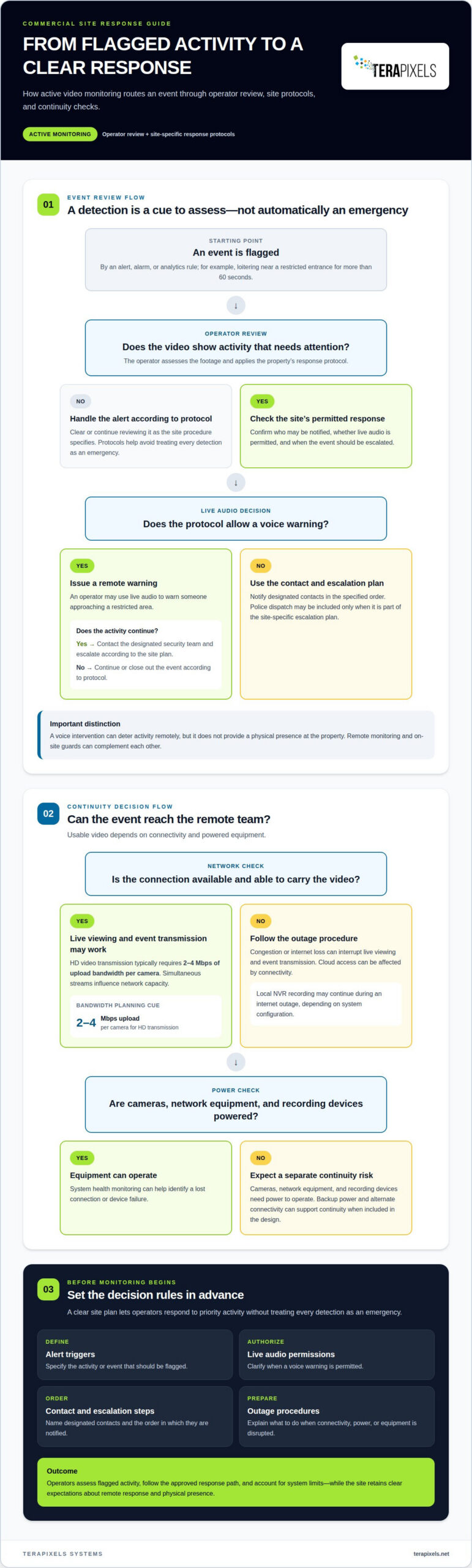
Active monitoring adds operator review of camera footage, alarms, and analytics. When an event is flagged, operators assess the video and follow the property’s response protocol. This allows businesses to act on relevant activity rather than relying only on recorded footage after an incident.
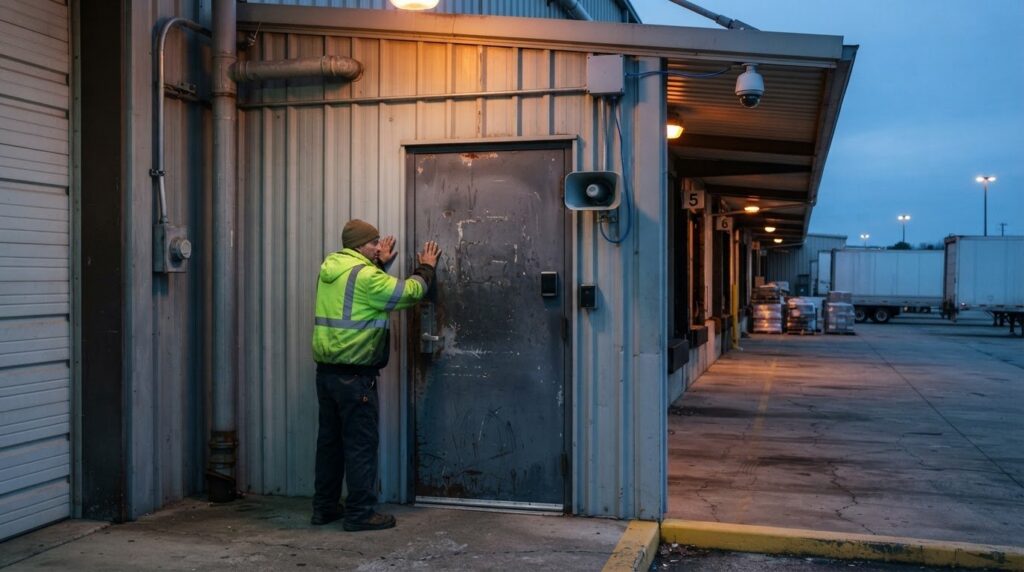
Protocols can specify who operators notify and when they escalate an event. For example, an operator might use live audio to warn someone approaching a restricted entrance, then contact the site’s designated security team if activity continues. Police dispatch may be part of a site-specific escalation plan. Live audio intervention can deter activity remotely, but it does not provide a physical presence at the property.
Connectivity affects whether remote centers receive usable video. HD video transmission typically requires 2-4 Mbps of upload bandwidth per camera, so simultaneous streams influence network capacity. Congestion or an internet outage can interrupt live viewing and event transmission. Recording may continue locally on a Network Video Recorder, depending on system configuration, while cloud access can be affected by connectivity.
Power loss creates a separate risk: cameras, network equipment, and recording devices need power to operate. System health monitoring can help identify a lost connection or device failure, while backup power and alternate connectivity can support continuity when included in the design. The response depends on which equipment remains operational and whether footage can reach operators.
Before monitoring begins at a commercial site, define alert triggers, live audio permissions, contact order, and outage procedures. Clear protocols help operators protect priority areas without treating every detection as an emergency.
Terapixels Systems: Remote Monitoring Management
Terapixels Systems provides Remote Monitoring Management for businesses seeking professional oversight of commercial security systems. It may be a suitable next step when camera footage needs to support active monitoring, site-specific response protocols, or coordinated security infrastructure.
System performance also depends on the infrastructure that carries and protects video. Structural Cabling supports business communications, while Cyber Security helps protect connected systems. The right combination depends on camera coverage, network design, and operational requirements, rather than a standard package.
For a commercial property planning a new system or refining existing security infrastructure, Terapixels Systems can help align monitoring needs with the supporting technology. Contact Terapixels Systems to discuss your property’s monitoring requirements.
Set a Clear Direction for Your Security Plan
Start by defining what effective monitoring should support at your property: protecting access points, supporting incident review, or improving visibility across operations. For remote video monitoring services for commercial properties, those priorities shape coverage, user permissions, and response protocols. Clear objectives help align system design with how managers use footage, rather than treating technology as an isolated purchase.
Before changing or expanding a system, identify who owns security decisions, which events need attention, and how footage should support follow-up. A discussion with Terapixels Systems can consider your existing infrastructure and monitoring goals, establishing a practical basis for the next stage of planning.
A well-defined plan gives your team a clearer path to security that supports the way your property operates.
Frequently Asked Questions
Can I Use My Existing Security Cameras?
Existing commercial cameras may be suitable if they provide network-accessible video that is compatible with the monitoring platform. A professional assessment considers camera models, image quality, recording capability, network connections, and secure access. For example, an older system may record locally but lack the interface needed for remote viewing. Compatibility depends on the complete setup, not simply the number of cameras.
What Happens if the Internet or Power Goes Down?
An internet outage can interrupt remote viewing and video transmission, while a powered on-site recorder may continue recording if configured for local storage. During a power outage, cameras and recording equipment need backup power to keep operating. A network failure with a powered recorder differs from a site-wide power loss; the system configuration determines which functions remain available.
What happens when suspicious activity is detected?
A remote operator can review a flagged event and follow the property’s response protocol. Depending on the event and plan, the operator may issue a live audio warning, notify designated contacts, escalate to a security team, or request police dispatch. Clear instructions about restricted areas and contact order help ensure the response fits the site’s needs.
How does remote video monitoring compare with on-site security guards and traditional alarm systems?
Remote video monitoring provides visual review from off site, while on-site guards provide a physical presence. A traditional alarm can signal a triggered condition, while video adds context about what is happening. These approaches serve different functions and can complement each other. For example, a business may use alarms to identify events and footage to assess them.
What equipment is needed to add remote monitoring to existing commercial security cameras?
The setup generally requires compatible cameras, a network connection, and a way to transmit or store footage, such as an on-site recorder or cloud storage. Secure network configuration and reliable power also matter. A professional assessment can determine whether existing cabling and recording equipment support remote access or whether components need to be integrated or updated.