

For businesses searching for “commercial CCTV installation,” the most useful starting point is not the number of cameras but what the system needs to see. A commercial CCTV system works best when it is designed around a site’s risks, how people move through the space, and what staff need to review during daily operations.
Camera placement, recording options, network requirements, and installation timing all affect how well a system fits a business. This guide explains how to set surveillance priorities, plan coverage, and compare system choices with ongoing operations in mind. It also covers how CCTV can work alongside cloud-based surveillance, access control, remote monitoring management, and network infrastructure. A clear plan helps you make informed decisions about your current needs and future changes.
Key Takeaways
- Plan commercial CCTV around site-specific risks and business routines, not simply the number of cameras.
- Match each camera’s coverage to its intended task, considering field of view, image detail, lighting, and recording needs.
- Use a clear process from site survey and design through installation, configuration, and testing.
- Set procedures for footage and alerts, and consider how CCTV may connect with access control, remote monitoring management, and network security.
How commercial CCTV installation begins with your business’s security risks
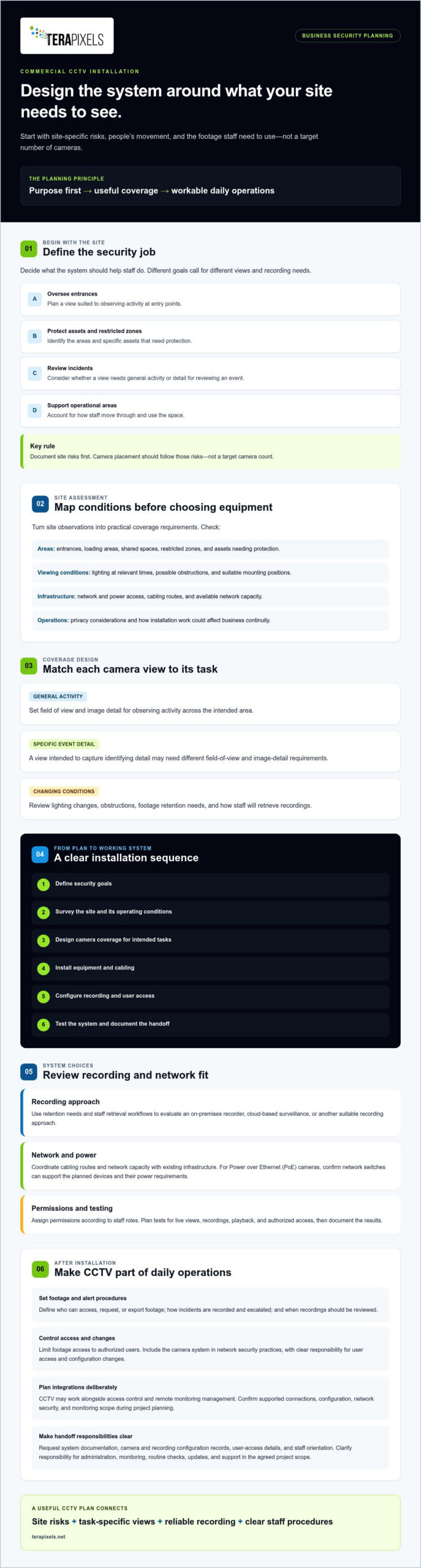
Commercial CCTV installation involves planning, deploying, and configuring cameras to meet a business’s security needs. Start by deciding what the system should help you do: oversee entrances, protect assets, review incidents, or monitor operational areas. Each goal calls for different coverage, so equipment choices should follow an assessment of the site and how staff will use the footage.
Map risks before choosing cameras. A view suited to an entrance may not provide useful coverage of a loading area or a specific asset. A general introduction to Closed-circuit television (CCTV) explains the technology, but a site-specific assessment is what helps determine how it can serve your facility.
What should a commercial CCTV site assessment identify?
Map entrances, loading areas, shared spaces, restricted zones, and assets that need protection. Check lighting at relevant times, possible mounting positions, network and power access, privacy considerations, and how installation could affect business continuity. Then turn those observations into practical coverage requirements. For example, note whether a camera needs to observe general activity or provide detail for reviewing a specific event.
Camera placement should follow documented site risks, not a target camera count. This keeps the design focused on useful views rather than adding equipment without a defined purpose. Once objectives and site conditions are clear, the plan can support both security priorities and daily operations.
Planning Commercial CCTV: From Coverage to Commissioning
A well-planned installation follows a clear sequence: define security goals, survey the site, design camera coverage, install equipment and cabling, configure recording and access, then test the system. This process turns a broad request into decisions that fit the facility and its operations.
The planning and managing physical security resources guidance from CISA offers a broader framework for organizing security decisions. Apply that approach to camera design, then coordinate cabling routes and network capacity with existing infrastructure. For Power over Ethernet (PoE) cameras, confirm that network switches can support the planned devices and their power requirements. Protect system access by assigning permissions according to staff roles.
Which design and installation decisions should businesses review?
Before installation, confirm that each camera location and its image detail fit the intended observation or identification task. Review the recorder or cloud architecture, cabling paths, user permissions, and the planned tests for live views, recordings, playback, and authorized access. Also discuss how installation work can be scheduled around business activity.
Where analytics are being considered, review the AI security camera system commercial implementation guide for related planning considerations. During project discovery, confirm which analytics, recording options, and integrations are available. Document test results and the system handoff so staff know how to use the setup.
How commercial CCTV supports ongoing security operations after installation
A camera system is more useful in day-to-day operations when staff know who can access footage, how to respond to alerts, and when recordings should be reviewed. Document these procedures, including who can request or export footage and how incidents are recorded and escalated. Limit access to authorized users, and align retention practices with the organization’s policies and applicable requirements.
Consider how CCTV may work with access control and remote monitoring management. For example, a documented procedure could direct authorized staff to review relevant footage after an access event. The available connections depend on system configuration, network security, and the agreed monitoring scope, so confirm what is supported during project planning. Include the camera system in network security practices, with clear responsibility for user access and configuration changes.
What should the CCTV project handoff include?
Request system documentation, camera and recording configuration records, user-access details, and an orientation for the staff who will use the system. Clarify who is responsible for ongoing administration, monitoring, routine checks, updates, and support. Confirm responsibilities and service boundaries in the agreed project scope rather than assuming they are included.
A practical handoff also records how to review footage, manage user permissions, and report a camera or recording issue. Where broader infrastructure oversight is relevant, the remote monitoring management guide for business continuity offers additional context. Clear ownership helps keep the system part of established security procedures as staff and business needs change. Terapixels Systems provides commercial CCTV and surveillance solutions, alongside related access control, analytics, remote monitoring management, and cabling capabilities.
Build a CCTV plan that works beyond installation
Effective commercial CCTV starts with business risks, not a preset camera count. Define what you need to oversee, protect, or review, then shape camera coverage around site conditions and daily operations. For commercial CCTV installation Southern California planning—whether coordinating a regional facility or organizing AI security camera installation Beverly Hills—carry that approach through design, configuration, testing, and staff handoff so the system remains useful over time.
Ongoing value also depends on clear procedures: who can access footage, how alerts are handled, and who manages routine checks and updates. Terapixels Systems combines commercial CCTV and cloud-based surveillance capabilities with integration across access control, analytics, remote monitoring management, and cabling. The right configuration and service scope can be discussed in relation to your facility’s requirements.
Frequently Asked Questions
How is a commercial CCTV system designed for a business?
A commercial CCTV system is designed around the business’s security objectives and site conditions. The process typically begins by identifying what needs oversight, such as entrances, assets, or operational areas, then assessing camera views, lighting, network and power access, and recording needs. The design should also account for who will use the footage and how the system will be tested before handoff.
Can commercial CCTV integrate with access control?
Yes, commercial CCTV may integrate with access control, depending on the systems, configuration, and project requirements. For example, staff may use an access event as a cue to review relevant footage if the integration supports that workflow. Confirm compatibility, user permissions, network requirements, and included functions during project discovery. Terapixels Systems offers CCTV and access control systems.
What should a business consider before installing security cameras?
Before installing cameras, define the security objectives and identify which areas need observation. Then consider lighting, camera placement, image detail, cabling, power, network capacity, recording method, and footage retention. Review privacy considerations, who will be authorized to view recordings, and how installation can fit business operations. These decisions help shape a system for the site rather than relying on equipment alone.
Does commercial CCTV installation include ongoing monitoring?
Not necessarily. Installation and ongoing monitoring are distinct needs, so confirm whether monitoring is included in the agreed project scope or must be arranged separately. Clarify who reviews alerts or footage, who manages user access, and who handles routine checks, updates, and support. Terapixels Systems offers Remote Monitoring Management, but the monitoring scope and responsibilities should be confirmed during project discovery.