CONTACT US

What if the most expensive mistake in your new office build-out isn’t the square footage or the designer furniture, but the wires hidden behind your drywall? Planning the network cabling for new office build-out projects is often the most overlooked phase, yet it’s the physical nervous system that dictates your future success. You’ve worked hard to design a space that reflects your brand’s growth, and you shouldn’t have to worry about the hidden costs of tearing open walls to upgrade cables just months after your team moves in.
We understand that managing these technical details can feel overwhelming, especially when you’re balancing general contractors and strict local regulations. This article provides a comprehensive, step-by-step checklist to ensure your infrastructure is scalable, secure, and compliant with the 2026 NEC Article 722 reorganization and California Title 24 energy standards. You’ll learn how to choose the right cable category for Wi-Fi 7, why OS2 fiber is the new backbone standard, and how to coordinate your installation for a future-proof finish.
Key Takeaways
- Learn to select the optimal standards by comparing the 10Gbps distance capabilities and bandwidth potential of Cat6, Cat6A, and OS2 fiber optics.
- Discover why over-provisioning your network cabling for new office build-out by 20% is the most cost-effective way to accommodate future staff expansion and hardware upgrades.
- Identify the essential infrastructure requirements for integrating cloud-based surveillance systems and access control sensors into your building’s physical layout.
- Gain a clear roadmap for the construction process, covering everything from professional labeling schemes to the critical installation of firestopping and conduit.
- Understand why specialized data contractors are necessary for achieving high-speed certification and complying with complex Southern California building codes.
Table of Contents
- Pre-Construction: Assessing Your Office Connectivity Needs
- Selecting the Right Standards: Cat6, Cat6A, or Fiber Optic?
- Beyond the Desk: Cabling for Security, Access Control, and AV
- The Ultimate Office Build-Out Cabling Checklist
- Executing the Build: Why a Specialized Contractor Matters in Southern California
Pre-Construction: Assessing Your Office Connectivity Needs
Successful network cabling for new office build-out projects starts long before the first wire is pulled through a conduit. It begins with a comprehensive Structured cabling system, which acts as the unified infrastructure supporting your data, voice, and security communications. Think of this as the building’s nervous system; it must be designed to accommodate not just today’s headcount, but the technological demands of the next five years. Without a clear plan, you risk the stability of your entire operation.
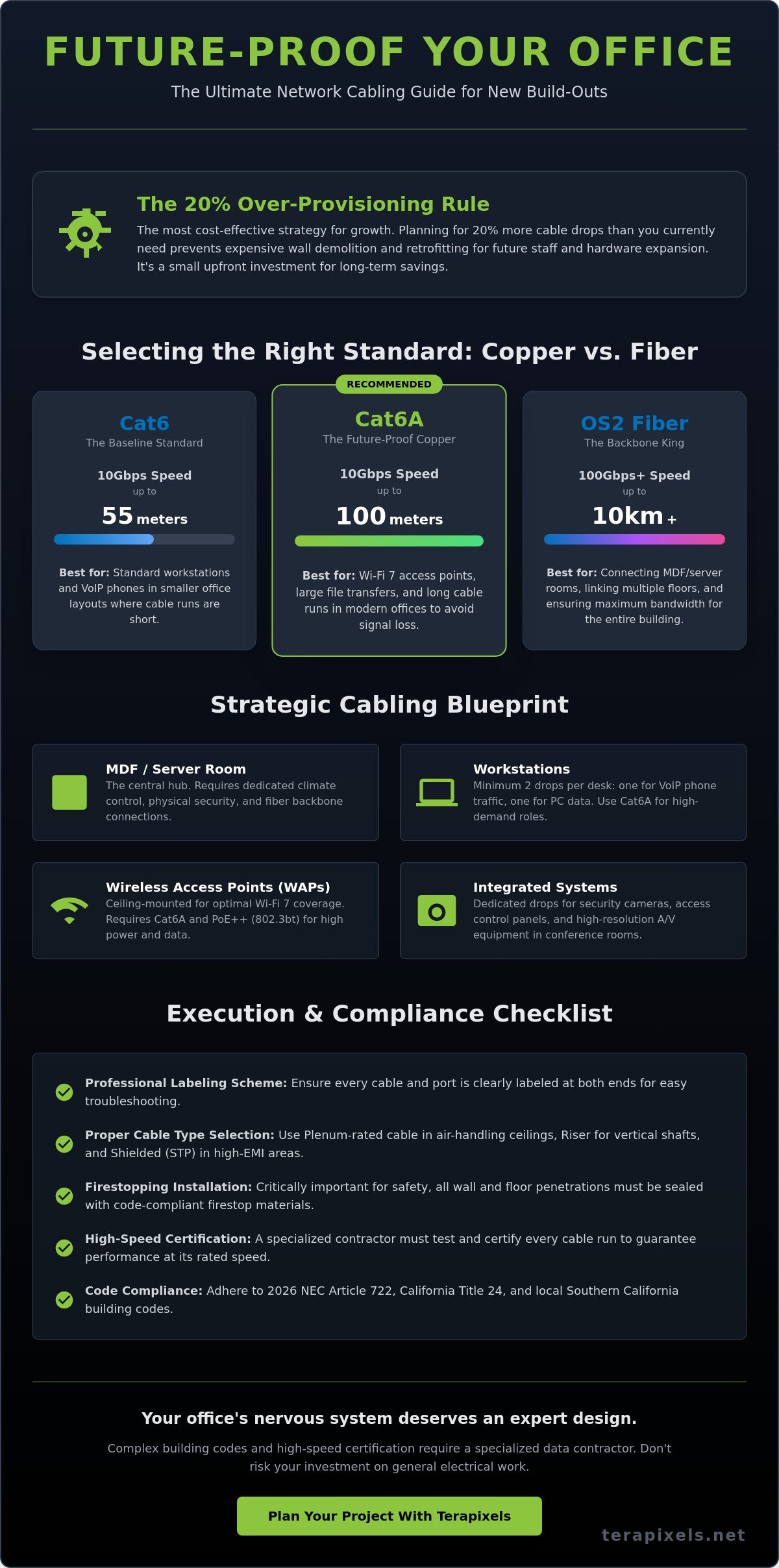
One of the most common pitfalls in office construction is underestimating future connectivity needs. We recommend over-provisioning your cable drops by at least 20%. This buffer prevents the high costs of retrofitting and wall repairs when you eventually add new workstations or specialized hardware. It’s a small upfront investment that protects your long-term budget.
Your floor plan should prioritize the Main Distribution Frame (MDF) as the central hub for all connectivity. This room requires dedicated climate control and physical security to protect your core switches and servers—and because structural integrity is vital to prevent environmental damage to this equipment, you should check out Transition Roofing for professional guidance. Beyond the MDF, you must identify high-density zones. Conference rooms, server rooms, and open-plan bullpens require significantly more throughput than a standard hallway or breakroom. Mapping these zones early ensures your network cabling for new office build-out supports peak performance during high-traffic business hours.
Calculating Port Density per Workstation
Standard office layouts should provide at least two drops per desk to separate VoIP traffic from PC data. Departments like engineering or creative media often require dedicated fiber or Cat6A lines to handle large file transfers without bottlenecking the rest of the office. The TIA/EIA-568 standard serves as the universal framework for commercial office telecommunications cabling, ensuring that different components work together seamlessly within a single building. If you’re new to these concepts, our guide on what is structured cabling and how it works for modern businesses provides a thorough foundation before you begin your build-out planning.
Planning for Wireless Access Point (WAP) Placement
Modern offices rely heavily on mobility, making ceiling-mounted cabling essential for Wi-Fi 7 coverage. These access points require specific Power over Ethernet (PoE) standards, such as PoE++ (802.3bt), to deliver both high-speed data and sufficient wattage. In Southern California, many office parks use concrete or reinforced steel construction, which can create significant signal “dead zones.” Proper placement ensures your team remains connected regardless of where they sit or move within the suite.
Selecting the Right Standards: Cat6, Cat6A, or Fiber Optic?
Choosing the right physical media is a decision that defines your office’s operational ceiling for the next decade. While it’s tempting to focus solely on current speeds, the network cabling for new office build-out projects must account for the 10-Gigabit requirements of modern AI tools and high-resolution AV systems. The ANSI/TIA-568 cabling standards provide the technical blueprint for these selections, ensuring your hardware remains compatible with global infrastructure.
Standard Cat6 copper is often sufficient for basic tasks, but it faces a significant limitation: it only supports 10Gbps speeds up to 55 meters. In contrast, Cat6A maintains that 10Gbps performance for the full 100-meter channel. If your floor plan involves long runs from the MDF to the furthest workstations, Cat6A is the only reliable choice to avoid signal degradation. This ensures your team won’t experience lag during high-bandwidth activities like video conferencing or cloud-based data analysis. For a deeper look at how these standards apply to your specific building type, our CAT6 cabling installation commercial guide for 2026 covers local code compliance and Wi-Fi 7 integration in detail.
Safety and compliance are equally critical. California building codes require specific jacket materials based on where the cable is installed. Plenum-rated cables are mandatory for air-handling spaces, such as drop ceilings used for HVAC circulation, because they emit less smoke and fewer toxins during a fire. Riser-rated cables are used for vertical shafts between floors but don’t meet the same stringent requirements as plenum. In high-tech environments or offices near industrial machinery, electromagnetic interference (EMI) can disrupt data. Shielded Twisted Pair (STP) cabling uses a foil wrap to block this noise, whereas Unshielded Twisted Pair (UTP) is the standard for typical commercial suites. If you’re unsure which standard fits your specific layout, our team specializing in Fiber and CAT6 Cabling can help you map out a compliant, high-performance solution.
Future-Proofing with Cat6A
By 2026, Cat6A has become the baseline for new construction. It provides the necessary bandwidth for Wi-Fi 7 access points and the rising power demands of PoE++ devices. Cat6A uses specialized internal separators and a tighter twist to virtually eliminate alien crosstalk in dense cable bundles. This architectural advantage ensures that dozens of cables running through the same conduit don’t interfere with each other’s performance, maintaining high-speed data integrity across your entire office.
The Fiber Backbone Advantage
While copper serves the workstations, fiber optic cabling is the gold standard for your backbone infrastructure. It connects your primary server room to Intermediate Distribution Frames (IDFs) throughout the facility. For most Southern California offices, standardizing on OM4 or OM5 multi-mode fiber provides exceptional scalability for internal networking. However, if your network cabling for new office build-out involves building-to-building links or distances exceeding 400 meters, OS2 single-mode fiber is the superior choice for virtually unlimited bandwidth potential. Understanding how these components integrate into a cohesive system is essential; a complete overview of what is structured cabling as a standardized architecture can help clarify how fiber backbones, copper horizontal runs, and distribution frames work together.
Beyond the Desk: Cabling for Security, Access Control, and AV
Modern office design has moved past the era where data and security operated on separate islands. A truly unified network cabling for new office build-out integrates your communications, physical security, and environmental controls into a single, cohesive infrastructure. This convergence allows for more efficient management and ensures that your technology works in harmony rather than in silos. By addressing these needs during the initial design phase, you avoid the disruption of retrofitting hardware once your team is already settled in the space.
Integrating cloud-based surveillance systems for business requires more than just a standard Ethernet drop. These systems utilize high-resolution 4K cameras and AI-driven analytics that demand consistent, high-speed bandwidth and robust Power over Ethernet (PoE) support. Similarly, digital signage and conference room AV systems now rely on HDMI over IP or HDBaseT protocols. These technologies allow you to transmit high-definition video over long distances using standard category cables, but they require precise installation and high-quality termination to avoid latency or signal loss.
Smart building IoT is another critical consideration for the modern workplace. Facilities in Orange County increasingly incorporate environmental sensors and smart lighting to optimize energy use and employee comfort. These devices often connect via low-voltage cabling, feeding data back to a central management platform. Planning for these connections during the rough-in phase prevents the complications of adding them after the ceilings are closed and the walls are finished.
Dedicated Cabling for AI-Driven Security
Your security network serves as your first line of defense. High-performance AI cameras need stable connections to process real-time analytics without interruption. We typically recommend home-run cabling for security peripherals to ensure each device has a dedicated path to the switch, reducing potential points of failure. This infrastructure also facilitates seamless integration with remote monitoring management for business, allowing for proactive oversight of your facility’s health and connectivity status.
Access Control and Entry Management
Physical security extends to every entry point of your suite. Wiring for access control involves connecting low-voltage door controllers to maglocks, keycard readers, and REX (Request-to-Exit) sensors. In multi-tenant buildings, these systems must often interface with existing building intercoms or guest management platforms. It’s also vital to plan for battery backup systems within your cabling runs. This ensures your access control remains functional during power outages, maintaining the safety and security of your staff and assets at all times.
The Ultimate Office Build-Out Cabling Checklist
Executing a successful network cabling for new office build-out requires a disciplined, phase-based approach. A structured roadmap transforms a complex construction task into a series of manageable milestones, ensuring that no technical detail is overlooked before the drywall is finished. This methodical process provides the stability your business needs to support high-speed data and integrated security systems from day one.
- Phase 1: Design & Documentation – Develop comprehensive blueprints that include detailed rack layouts and standardized labeling schemes. This phase sets the architectural foundation for the entire project.
- Phase 2: Rough-In – Install J-hooks and conduits to support cable paths. This stage includes pulling the actual cable and ensuring all firestopping measures are in place to meet local safety codes.
- Phase 3: Termination & Testing – Secure cables into patch panels and wall jacks. Every drop must undergo rigorous testing to verify signal integrity and performance.
- Phase 4: Equipment Installation – Mount the physical racks and install essential hardware, including Uninterruptible Power Supplies (UPS), switches, and Wireless Access Points (WAPs).
- Phase 5: Final Documentation – Collect all as-built drawings, cable mapping charts, and certification reports. These documents are vital for future troubleshooting and network expansions.
Following this structured network cabling for new office build-out checklist ensures that your technical infrastructure is ready for modern business demands. For a precise implementation of these standards, our team can provide expert Structural Cabling services tailored to your specific floor plan.
Quality Control and Certification
You should always demand a “Fluke Test” report for every individual drop in your new facility. This certification proves that the installation meets the necessary bandwidth and performance standards for your chosen cable category. It’s vital to prioritize permanent link testing over channel testing. Permanent link testing evaluates the cable and the jacks installed in the walls, providing a more accurate measurement of the fixed infrastructure that you’ll rely on for years. Additionally, verify that all cables are labeled at both ends according to the ANSI/TIA-606-C standard to simplify future maintenance.
Rack and Room Management
A clean server room is a functional server room. We utilize both vertical and horizontal cable managers to create “spaghetti-free” racks that allow for easy hardware swaps and better airflow. Your Main Distribution Frame (MDF) room must also meet specific environmental requirements, including dedicated cooling to prevent equipment over-heating and sufficient power circuits for your hardware load. Finally, ensure proper grounding and bonding for all telecommunications systems to protect your sensitive electronics from electrical surges and interference.
Executing the Build: Why a Specialized Contractor Matters in Southern California
While a general electrician is essential for high-voltage power and lighting, network cabling for new office build-out projects requires a different level of technical precision. Data transmission at 10Gbps and beyond is sensitive to even minor installation errors, such as over-tightened cable ties or improper bend radiuses. Many general contractors lack the specialized certification equipment, such as Fluke DSX cable analyzers, necessary to verify that every drop meets the stringent performance standards your business requires. Choosing a specialized data partner ensures that your physical layer is verified for speed, not just connectivity.
Navigating the regulatory environment in San Diego and Orange County adds another layer of complexity to your build. Local inspectors have specific requirements for firestopping in plenum spaces and seismic bracing for server racks. A partner who understands these regional nuances can manage the permitting process efficiently, preventing mid-project delays that could push back your move-in date. By integrating your infrastructure with managed IT monitoring from the start, you gain a steady hand that oversees the network’s health long after the construction crews have left the site.
The value of a single-source partner cannot be overstated. When one team handles your structural cabling, security, and networking, you eliminate the “finger-pointing” that often occurs between multiple vendors. This unified approach ensures that your cabling perfectly supports your hardware, creating a seamless transition from a construction site to a fully operational headquarters.
San Diego and Orange County Local Expertise
Southern California’s unique geography and industry mix require localized knowledge. We understand the specific seismic requirements for securing equipment in high-rise offices in Downtown San Diego or tech campuses in Irvine. Whether you are in the biotech sector in Carlsbad or a creative agency in Costa Mesa, your network cabling for new office build-out must reflect the specific density and security needs of your industry. Our proximity allows for rapid coordination with local building departments, ensuring your project remains compliant with the latest California building and fire codes.
The Terapixels Systems Advantage
Terapixels Systems provides a comprehensive, integrated approach to your office infrastructure. Our expertise spans beyond simple wiring to include commercial cybersecurity solutions and AI-driven security systems. We use high-end testing equipment to provide you with a full certification report for every drop, guaranteeing that your network is ready for the demands of 2026 and beyond. If you are ready to ensure your new workspace is built on a foundation of reliability and protection, contact Terapixels Systems for a consultation to begin your planning phase.
Building a Foundation for Your Future Workspace
Designing your new office is a unique opportunity to build a resilient infrastructure that supports high-speed connectivity and AI-driven security for years to come. By prioritizing Cat6A standards and integrating your surveillance and access control into your initial plans, you avoid the hidden costs of future retrofits. A successful network cabling for new office build-out depends on precise documentation and rigorous testing to ensure every drop performs at its peak from the moment your team moves in.
As Certified Structured Cabling Experts and Integrated Security & Networking Specialists, Terapixels Systems provides the steady hand you need to manage these complex background systems. Our team offers dedicated Local San Diego & Orange County Support to help you navigate local building codes and seismic requirements with confidence. We handle the technical complexities so you can focus on your core business objectives.
Schedule a Consultation for Your San Diego or Orange County Office Build-out
We look forward to partnering with you to create a stable, secure, and high-performance environment where your business can thrive.
Frequently Asked Questions
When should I start planning the network cabling for my new office build-out?
You should begin planning your infrastructure during the initial architectural design phase, ideally before any walls are constructed. This timeline allows for the proper placement of conduits and the central Main Distribution Frame (MDF) while the floor plan is still flexible. Integrating network cabling for new office build-out requirements early prevents expensive change orders and ensures that cable paths don’t conflict with HVAC or plumbing systems.
What is the price difference between Cat6 and Cat6A for a typical office?
Cat6A involves a higher upfront investment than standard Cat6 because the cables are thicker, require specialized shielding, and demand more labor-intensive termination. While Cat6 is effective for shorter distances, Cat6A is the superior choice for supporting 10Gbps speeds over the full 100-meter range. Most businesses find the cost difference is justified by the long-term scalability and the prevention of future infrastructure upgrades as data demands increase.
Can I just use WiFi for everything in my new office?
Wireless connectivity is a vital tool for mobility, but it isn’t a replacement for a structured wired backbone. High-bandwidth devices like servers, desktop workstations, and security cameras require the stability and speed of a physical connection to avoid latency and interference. Every wireless access point also requires a high-quality cable run to the switch to deliver the throughput required by modern Wi-Fi 7 standards.
How many data drops do I need per employee?
The industry standard is to provide at least two data drops per workstation. This setup allows for a dedicated connection for a primary computer and a separate line for a VoIP desk phone, which prevents data congestion. For specialized departments like engineering or video production, you may want to consider additional drops or dedicated fiber runs to handle exceptionally large file transfers without affecting the rest of the network.
What is a plenum-rated cable and do I need it for my Orange County office?
Plenum-rated cable features a specialized jacket that produces low smoke and fewer toxins if it’s exposed to fire. It’s legally required for any installation in an air-handling space, such as the area above a drop ceiling used for HVAC circulation. Orange County building inspectors are very strict about these requirements, so using plenum-rated cable is essential for both fire safety compliance and passing your final inspections.
How do I ensure my cabling supports my security camera system?
Your network cabling for new office build-out must be designed to handle the high wattage and bandwidth demands of modern Power over Ethernet (PoE) devices. Using CAT6 cabling installation for commercial buildings ensures that 4K AI-driven cameras receive consistent power and a stable data path for real-time analytics. We recommend home-run wiring for all security peripherals to minimize potential points of failure and simplify the management of your surveillance network.
What should be included in a structured cabling certification report?
A comprehensive certification report should include individual Fluke test results for every cable drop in your facility. This document verifies critical metrics such as the wire map, cable length, and signal-to-noise ratio to prove the installation meets TIA/EIA standards. These reports are essential for your records, as they provide a baseline for future troubleshooting and confirm that your infrastructure can support its rated speeds.
Do I need a separate cable for my VoIP desk phone?
Providing a dedicated cable for your VoIP phone is highly recommended to ensure the best possible call quality. While some phones allow you to share a connection with a PC, separate lines let you isolate voice traffic on its own Virtual Local Area Network (VLAN). This prevents heavy computer data usage from causing jitter or dropped calls and makes it much easier for your IT team to troubleshoot connectivity issues.